PDF Sprint
Dian WuTools
3.454.00 Reviews
- Version
- 1.0.2
- Installs
- 100.00K
- Age Rating
- Everyone
Screenshots
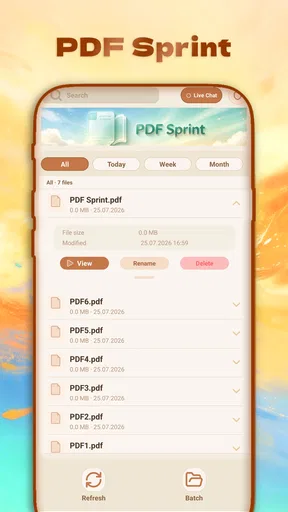
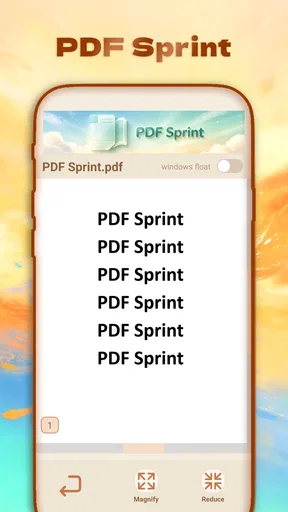
Our Review of PDF Sprint
 Analysis by Appyee
Reading a PDF on a phone is usually less comfortable than it should be. Even when the file opens correctly, I often find myself pinching the screen, losing my place, or staring at a page that was designed for a much larger display. PDF Sprint, a free tools app from Dian Wu, takes a more focused approach: it is built around making PDF reading feel quicker and less awkward on a mobile device. That narrow purpose is also what makes it worth considering.
I reviewed it as someone who regularly opens documents away from a computer, rather than as a person looking for a complete document-management suite. My impression is that its value depends on one simple question: do you want a lighter reading experience, or do you need a full PDF office with editing, signing, scanning, conversion, and file organization? For the first need, this app has a clear appeal. For the second, it may feel too limited.
The app is available at no cost and is rated for Everyone, so it is easy to approach for casual readers, students, commuters, and families sharing a device. Its current version is 1.0.1, and it requires Android 10 or later. That requirement is reasonable for many modern phones, though anyone using an older device should check compatibility before planning around it.
Why a focused PDF reader can feel better on a phone
I look at this section as a question of attention: what makes a phone feel like a useful reading device rather than a cramped compromise? A focused reader can make it easier to settle into a document without turning a quick check into a software task. That distinction matters most when the file is only one small part of a busy day.
The central idea is reducing reading friction
The most important capability here is not a long list of tools. It is the attempt to make reading itself more convenient. That distinction matters. A PDF reader can technically open a file and still be unpleasant to use if every page requires manual resizing or if the interface gets in the way of the text.
In my experience, a focused reader is most useful when I already have the document and simply want to understand it. A timetable, instruction sheet, class handout, travel document, work brief, or digital book does not always need annotation or conversion. It needs to open promptly, remain readable, and let me move through the material without constant screen adjustments.
That is where PDF Sprint makes sense as a mobile reading tool. Its purpose is easier to understand than that of a large productivity package. Instead of asking me to learn a complete document workflow, it points toward the everyday task of opening a PDF and getting through it.
This focus can also make the app less intimidating for people who do not enjoy complicated software. Someone who only reads PDFs a few times a week may not want a crowded toolbar or a subscription-oriented workspace. A simpler reading-first experience can be more approachable, particularly on a smaller screen.
What this focus changes in everyday use
The practical benefit is not that a PDF suddenly becomes a different kind of file. The benefit is that the phone becomes less of an obstacle between me and the page. When I am standing on a platform or checking a document during a short break, small interruptions matter. A reader that keeps attention on the content is more useful than one that constantly reminds me of its controls.
I also like the idea of separating reading from document production. Editing and signing are valuable, but they can make an app feel oversized when my immediate goal is only to review information. PDF Sprint is better understood as a companion for consumption rather than a replacement for a desktop document suite.
That distinction is important before installing it. If you expect to mark up contracts, rearrange pages, complete forms, or export a document into another format, you should not assume that a reading-centered app will replace those dedicated tools. Its strength is the reading moment, not every task that can happen around a PDF.
How I would use it when choosing between several readers
When I compare a focused PDF app with the usual alternatives, I look at the amount of work required before reading begins. Some people already have a preferred file manager, cloud service, or office suite, and opening a PDF through that existing app may be enough. In that case, adding another reader only makes sense if PDF Sprint feels more comfortable for repeated reading.
On the other hand, a general office app can bring unnecessary complexity. It may show editing options, account prompts, document templates, or other features when I am only trying to read a few pages. A browser can sometimes display a PDF, but browser-based reading is not always the most settled experience, especially when I move between files or return to a document later.
The trade-off is straightforward: a specialized reader can be easier to approach, while a broader app gives me more ways to manipulate the file. I would choose PDF Sprint when reading comfort matters more than document creation. I would choose a broader alternative when the PDF is part of a larger work process.
How the reading experience fits real routines
Here I’d focus on the moments when a PDF has to fit around everything else: a brief pause, a trip across town, or a task that calls for checking one detail and moving on. I find that having a clear purpose for each reading session helps me choose the right tool and avoid expecting a phone app to replace a full document workflow. The next section looks at which routines benefit most.
A realistic commute scenario
Imagine receiving a PDF schedule or a short work document just before leaving home. I would open it on my phone, scan the headings, read the relevant section, and close it again without wanting to build a permanent filing system. This is the kind of short, practical session where a dedicated reader can earn its place.
The same applies to a student reviewing lecture material between classes. The student may not need to edit the document; they need to locate a page, read a paragraph, and return to the surrounding context. On a phone, the difference between a smooth session and an irritating one is often the number of times the reader must stop to fight the interface.
For travel, I can see another useful pattern. A person may keep a confirmation document, directions, or a booking file on the device and open it only when needed. A lightweight reading workflow is preferable to opening a full office environment in a crowded terminal. The app’s appeal is strongest when the document is already prepared and the phone is being used as a convenient reference screen.
Use it as a reading checkpoint, not your entire document system
One practical tip is to treat the app as a checkpoint in a larger workflow. I would organize important files elsewhere, then use PDF Sprint when I need to read them. That keeps expectations realistic and avoids turning a focused reader into a substitute for storage, backup, or document administration.
This approach is especially useful for temporary files. If I download a manual to solve a problem, I want to read the relevant pages and move on. If I receive a long report, I may use the app for an initial review before deciding whether I need a more powerful tool for notes or collaboration.
Another useful habit is to prepare the document before a situation where connectivity or time may be limited. I would make sure the file is already on the phone, then open it in advance rather than waiting until I am in a hurry. That is not a special feature claim; it is simply the best way to get the most from any mobile PDF reader and avoid confusing file access with reading performance.
Where a reading-first design helps concentration
There is a subtle advantage to using a tool with a clear purpose: it can reduce decision fatigue. When an app presents fewer competing actions, I spend less time deciding whether to edit, share, convert, or annotate. For a person who reads documents in short sessions, that can make the experience feel more direct.
I find this particularly relevant for reference material. A recipe, equipment guide, school notice, or instruction document is often read with a specific question in mind. I do not necessarily want to transform the file. I want to find the answer and continue with the task in front of me.
That said, a clean reading focus should not be confused with advanced accessibility or research functionality. People who need complex study systems, extensive highlighting, cross-document search, or detailed notes may still prefer a more established reading platform. PDF Sprint is most convincing when the desired outcome is simply understanding the page.
Questions about compatibility and audience
The minimum operating-system requirement is Android 10, which makes the app relevant to users with reasonably recent Android phones but excludes older devices. I would check the phone’s software version before recommending it to someone who keeps an older handset for basic tasks.
Its Everyone age rating also makes it suitable for general household use. A parent could reasonably consider it for a child reading school material, while an older relative may appreciate a tool that is centered on opening documents rather than managing a complicated office account. The real suitability still depends on the person’s need for editing and organization.
The app is free, so trying it does not require a purchase decision. That lowers the barrier for occasional readers. It also means I would judge it by how much time and frustration it saves, rather than expecting it to replace every paid document utility.
The best fit: short, repeated reading on a phone
For me, the strongest case is not one unusually long session but a dependable habit of opening documents on the go. Repeated, low-effort use can matter more than a long feature list, especially when the phone is being used as a reference screen. I’ll also weigh when that convenience is worth keeping a dedicated reader and when an existing app is the simpler choice.
Who gains the most from the focused capability
The strongest audience is people who read PDFs frequently but do not work with them professionally. Students, commuters, travelers, renters checking agreements, and anyone who receives documents by message or email can benefit from a reader that keeps the task simple.
I would also recommend testing it for people who find large office apps distracting. If someone routinely opens a PDF only to read a few pages, a focused tool may feel more natural than an application designed for document production. The value grows when the same reading pattern happens repeatedly: open, locate, understand, close.
It can also suit users who want a separate place for reading. Keeping a dedicated reader apart from a work suite may help create a clearer boundary between viewing a document and changing it. That is a small workflow decision, but it can prevent accidental edits or unnecessary handling when the original file only needs to be consulted.
Who should choose another option
I would skip PDF Sprint if my main reason for installing a PDF app is editing. The same applies if I need a dependable system for signatures, form completion, page extraction, conversion, collaborative comments, or document scanning. Those jobs call for tools designed around manipulation rather than reading.
I would also hesitate if I rely on a large existing ecosystem for cloud storage and office work. A broader alternative may be more convenient when documents are constantly moving between email, shared folders, spreadsheets, and team workflows. Adding a separate reader can create another step instead of removing one.
Readers with advanced study needs should think carefully as well. If I am building a research library, comparing many documents, or making extensive annotations, I need to evaluate whether a basic reading-centered workflow gives me enough control. The app’s narrow purpose is an advantage for casual reading, but it becomes a limitation when reading turns into detailed document analysis.
Three practical trade-offs worth considering
First, simplicity can save time, but it can also mean fewer ways to handle unusual files. A person who reads ordinary documents may never notice this trade-off. Someone managing complex work documents may notice it immediately. I would therefore test the app with the kinds of PDFs I actually use rather than judging it only with a short, clean file.
Second, a dedicated reader can improve focus, but it creates one more app in the phone’s document workflow. If my current office suite already opens files comfortably, PDF Sprint must offer a noticeably better reading experience to justify that extra place in my routine.
Third, a free app is easy to try, but free does not automatically mean complete. I would install it for the reading task it promises, then keep a second tool available for jobs that require editing or file transformation. That two-tool approach is often more practical than demanding that one application do everything.
A small workflow that makes the app more useful
My preferred routine would be simple. I would keep original documents in a familiar storage location, open them in PDF Sprint when I want a reading session, and use a separate document tool only when I need to change the file. This keeps the roles clear and reduces the temptation to use a reading app for work it was not meant to handle.
For long documents, I would begin by identifying the sections I actually need instead of reading from the first page automatically. For short documents, I would use it as a quick reference during a task. In both cases, the key is to make the app part of a repeatable habit rather than expecting it to organize my entire digital life.
My verdict after looking at the complete picture
PDF Sprint has a sensible identity as a free PDF reading app for Android. Its strongest idea is also its clearest boundary: it aims to make reading more convenient, not to become a complete document workshop. I appreciate that focus because many mobile tools become harder to use when they try to cover every possible PDF task.
The developer, Dian Wu, has positioned the app in the tools category, where that practical purpose fits naturally. It has passed the early adoption stage with over one hundred thousand installs, while its average rating of 3.7 from around two hundred and fifty ratings suggests a mixed but meaningful response from users. I would read that rating as a reason to test it with personal documents, not as a reason to dismiss it outright.
For me, the deciding factor would be reading frequency. If I regularly open PDFs on an Android phone and want a straightforward way to get through them, this app is worth trying. If I only open a document once in a while and my current browser or office app already feels comfortable, the benefit may not be large enough to change habits.
I would recommend it to a friend who says, “I only need to read PDFs, and the apps I use feel unnecessarily busy.” I would not recommend it as the sole PDF solution for someone handling contracts, forms, academic research, or collaborative office files. In those cases, a broader alternative is likely the better fit.
Overall, PDF Sprint is most convincing when used for short, focused reading sessions: a document before a meeting, a guide while fixing something, course material between classes, or a confirmation file while traveling. Its value comes from keeping that moment uncomplicated. If your priority is getting comfortable with the page rather than changing the document, PDF Sprint is a practical app to try.
Verdict
Strengths of PDF Sprint
- Fast PDF viewing with smooth page navigation
- Simple interface that is easy for first-time users
- Useful search tools for finding text in long documents
- Supports convenient document sharing from the app
- Works well for reading PDFs on phones and tablets
Limitations of PDF Sprint
- Advanced editing features may be limited
- Large documents can take time to load on older devices
- Some features may require an internet connection
- Free version may include advertisements or restrictions
- Compatibility can vary with complex PDF layouts
Similar Picks in This Category
View All
Google LLC4.0

Gboard - the Google Keyboard
Google LLC4.5

Google Play services
Google LLC4.3

Google Play Store
Google LLC4.9

Files by Google
Google LLC4.5

SHAREit: Transfer, Share Files
Smart Media4U Technology Pte.Ltd.4.3
Frequently Asked Questions
What is PDF Sprint and what can I use it for?
PDF Sprint is a productivity tool designed to help users work with PDF documents more efficiently. Depending on the version available on your device, it may support tasks such as opening, reading, organizing, sharing, or making basic changes to PDF files. It is especially useful for students, office workers, and anyone who regularly needs to access documents while traveling or away from a computer.
Is PDF Sprint free to download and use?
PDF Sprint may be available as a free download, but some features can depend on the app’s pricing model, subscription options, or in-app purchases. Before installing it, check the current listing in the Google Play Store or Apple App Store for details about advertisements, premium tools, trial periods, and recurring charges. Reviewing this information first helps avoid unexpected costs after downloading.
Can PDF Sprint open and manage all types of PDF files?
PDF Sprint should handle standard PDF documents, including files received by email, downloaded from websites, or stored in cloud and device folders. However, performance can vary with password-protected, damaged, scanned, very large, or highly interactive files. Some documents may require additional permissions or specialized tools, so users should test the app with their typical PDFs before relying on it for important work.
Does PDF Sprint work offline, or does it require an internet connection?
Basic PDF viewing and access to files already stored on your device will often work without an internet connection, which makes PDF Sprint convenient for travel or areas with limited coverage. Internet access may still be needed for downloading documents, synchronizing cloud storage, sharing files through online services, receiving updates, or using any cloud-based or AI-powered features included in the current version.
Is PDF Sprint safe for opening and sharing private documents?
Users should review PDF Sprint’s privacy policy, requested permissions, developer information, and data-safety disclosures before opening confidential files. Avoid granting access that is not necessary for the app’s main functions, and be cautious when uploading documents to online services or sharing them through external platforms. For sensitive business, financial, or personal files, confirm how data is stored and processed first.
